ReefNetAI user guide
Practical guidance—from organizing field imagery to reviewing and exporting AI-assisted analysis.
New to ReefNetAI?
Follow one complete workflow in about ten minutes. You will create the fieldwork structure, add source data, choose an analysis, and check the result before export.
Find the right workflow
01 Organize fieldwork Projects, surveys, sites, visits, and imagery
02 Bring in CoralNet data Import images, points, labels, and provenance
03 Classify points Estimate cover with generated or imported points
04 Segment imagery Create and review benthic regions and masks
Recommended workflow
- Create the scientific context — project, survey, site, and visit.
- Add source data — upload images or attach a CoralNet dataset snapshot.
- Choose the analysis — point classification, segmentation, or a source classifier.
- Review the evidence — verify counts, uncertain outputs, labels, and provenance.
- Export deliberately — preserve the original export and document exclusions.
Platform overview
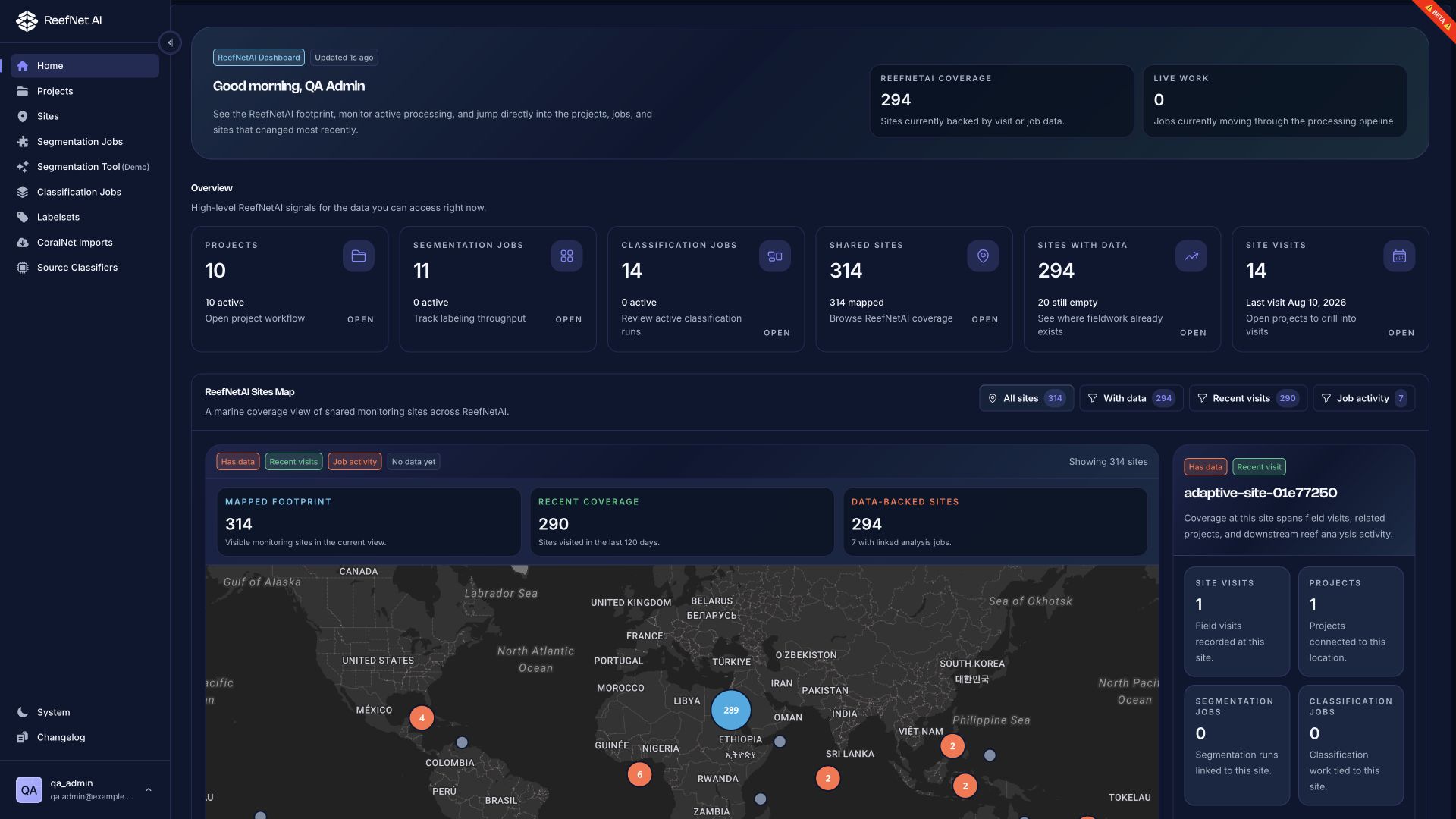 Open full-size dashboard screenshot
The dashboard summarizes accessible projects, jobs, sites, and recent activity. You can also go directly to any workflow from the main product navigation.
AI assists; experts decide
A completed processing job is not the same as a validated ecological result. Review outputs against the original imagery and your study protocol before analysis or publication.